Give each setup a name.
Friday co-op, a test server, or a few extras for another group. Keep multiple lists per game and share each with the friends you choose. New lists start private.
 WorkshopSync
A companion for Steam Workshop
See what your friends are subscribed to. Put together a list for each group, install what you want, and choose which games to keep in sync.
Checking the latest release…
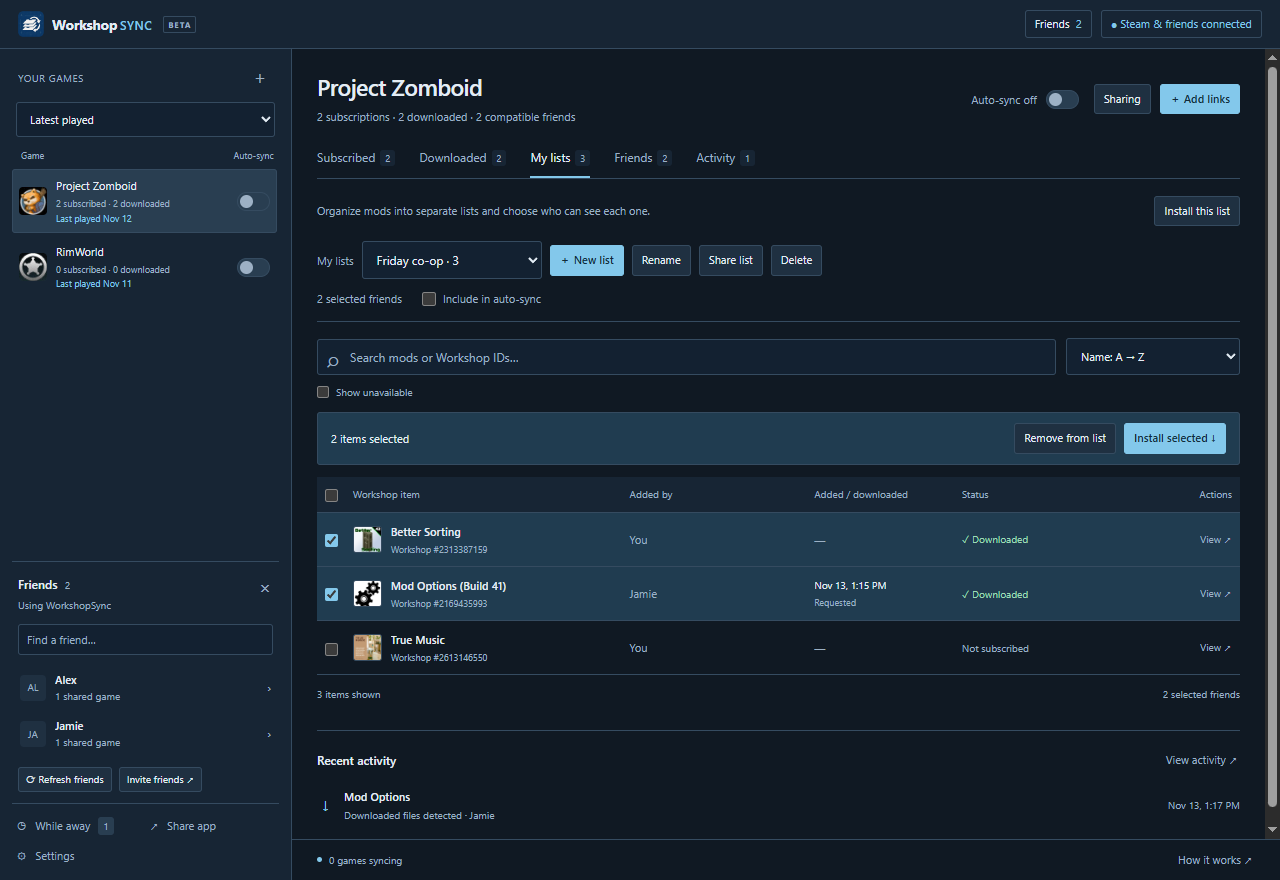
A separate list for every group. Select a whole row, then add those mods to the list you choose.
Full sizeLists & friend groups
You shouldn’t have to rebuild a collection or send another wall of links whenever the plan changes.
Friday co-op, a test server, or a few extras for another group. Keep multiple lists per game and share each with the friends you choose. New lists start private.
Browse one friend, a hand-picked group, or all compatible friends. Pick individual mods or install all available items from that group in one action.
Install a list once, or follow future additions. Each game has its own Auto-sync switch in the sidebar. Activity shows who added a mod and when local files were detected.
Find Workshop games by latest played or items shared between friends. Unavailable mods stay hidden by default. Choose from five color palettes, with dark, light, or system appearance.
The current release
Select mods by clicking the whole row, with selection actions above the list. Create named mod lists, share each with selected friends, and browse or follow custom friend groups.
Already installed?
Open Settings → Updates & about.
Download the update, then restart when you’re ready. Your saved mods and game preferences carry over.
How it works
Confirm your Steam identity in your existing browser. Friends appear once they’ve connected to WorkshopSync too.
Browse subscriptions and named lists, or paste Workshop links someone sent you. Collections and favorites aren’t needed.
Install your selection once. For future additions, choose friends or lists to follow and enable Auto-sync for that game. Steam manages the downloads.
The Windows app
A regular installer for your Windows account. Updates arrive inside the app, so your friends can keep using the same installation.
Download for WindowsWindows 10 / 11 · 64-bit · Beta
This beta has no Windows publisher certificate yet. Windows may show an unknown-publisher warning.
Checking the current installer…Loading release details.
Connecting friend sharing enables subscription sharing for Workshop games by default. You can limit the game’s audience or turn sharing off in its Sharing menu. New named lists start private, and each list can be shared with all connected friends or selected friends. A private list does not hide items already shared through your subscription inventory. Local download history stays on your PC.
Automatic synchronization starts off for every game. Browsing, selecting, and one-time installs don’t turn it on. To keep up automatically, follow the friends or lists you want and separately enable that game’s Auto-sync switch.
Both players need WorkshopSync to browse each other’s shared subscriptions and lists. If a friend doesn’t use it, you can still paste the Workshop links they send and subscribe to the items together.
Steam friends who have connected to WorkshopSync and are sharing items for the selected game. It doesn’t check whether mods work together. Dependencies, load order, and game versions still depend on the game.
The app checks on startup and hourly while open. Each update is checked against a signed release catalog and installer checksums before it can run. This is separate from a Windows publisher certificate. Choose Download update, then Restart & update when you’re ready.
No. WorkshopSync is an independent companion and is not affiliated with Valve. Steam and Steam Workshop belong to Valve. Workshop items remain the work of their respective creators.